

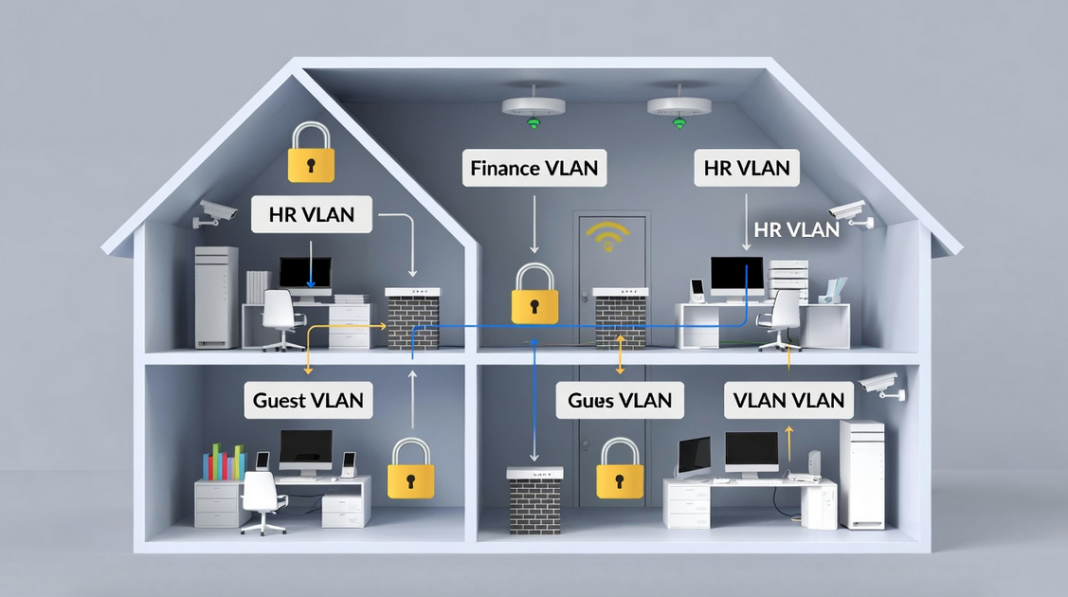

VLANs improve network security by logically dividing a single physical network into isolated segments (like separate rooms in a house), so that devices in one VLAN cannot directly access or attack devices in another VLAN unless explicitly allowed, greatly reducing the risk of unauthorized access, data leakage, and lateral movement by attackers.
It is like building invisible walls inside your house (your network) so that even though everything is connected by the same wires and switches, different groups of people (devices) can’t just walk into each other’s rooms without permission. This makes your whole setup much safer and easier to manage.
I’ll explain everything step by step. We’ll cover why they help security, how they actually work, real benefits, everyday examples, smart setup tips, possible weak spots (and fixes), how they stack up against other tools, what’s coming next, and why they still matter a lot this year.
How VLANs Make Your Network Much Safer
Think of your network without VLANs as one big open hall where every computer, phone, printer, and guest device can shout to everyone else. Anyone who sneaks in can listen, spread trouble, or reach important stuff like your bank files.
VLANs fix this by splitting the hall into separate rooms logically — no extra cables needed. Each room is its own broadcast domain, meaning announcements (broadcast traffic) only stay inside that room. This stops unnecessary noise, slows down snooping, and makes it hard for bad guys to move around if they get into one weak spot.
For example, hackers love “lateral movement” — they break into your guest Wi-Fi and then try to jump to your main computers or servers. VLANs block that jump unless you deliberately open a controlled door (with rules). You shrink the danger zone, protect sensitive info, and make the whole network tougher.
They also let you apply different locks to each room. Finance or HR gets extra-strong rules, while visitors get a locked side gate with no access inside.
What VLANs Really Are and How They Actually Work
A VLAN (Virtual Local Area Network) groups devices together based on what they do, who uses them, or how sensitive they are — not where they sit physically. Your accountant on the second floor and the boss’s laptop downstairs can be in the same “finance room” (say VLAN 10), while HR stays in VLAN 20.
Switches handle this magic using special tags (like little labels) added to data packets — this follows the IEEE 802.1Q standard. When a packet leaves a device, the switch adds a tag saying “this belongs to VLAN 10.” Devices in VLAN 10 talk directly to each other without tags getting in the way. But to talk to VLAN 20, the packet must go through a router (or Layer 3 switch), where you can check and block unwanted traffic.
This happens at Layer 2 (the basic connection level) of the network model, so it’s quick. The big security win? Sensitive groups stay hidden from regular users — no direct chatting unless allowed.
The Main Ways VLANs Boost Your Network Security
VLANs give you several strong advantages:
- Traffic stays isolated — Private data like payroll or customer records lives in its own VLAN, safe from prying eyes in other parts.
- Smaller broadcast zones — Without VLANs, every device hears every broadcast (like ARP requests), which attackers use to spy or spread malware. VLANs keep broadcasts trapped in one group, cutting noise and risks.
- Better control over who gets in — Assign people/devices by role (principle of least privilege: give only what’s needed). Finance VLAN gets tight rules; guest VLAN stays separate.
- Stops threats from spreading — If a computer gets hacked in the guest VLAN, the infection can’t easily jump to your main servers.
- Easier rule enforcement — Apply firewalls, access lists (ACLs), or monitoring exactly where needed — one room can have super-strict checks.
- Flexible changes — Move someone to a new department? Just change their VLAN tag — no rewiring offices.
These features together make your network harder to attack and simpler to run.
Real-Life Ways People Use VLANs to Stay Safe
Here’s how regular folks and small offices use them every day:
- Protect sensitive files — Put financial records, employee HR data, or medical info on separate VLANs so only the right people reach them.
- Lock down important gear — Routers, switches, servers, or management screens go on a special admin VLAN — only trusted admins get in.
- Keep guests separate — Guest Wi-Fi gets its own VLAN with internet only — no access to your printers, files, cameras, or internal stuff.
- Enforce rules and watch better — Apply custom policies per VLAN and monitor traffic closely to spot weird behavior fast.
- Limit broadcast spread — Malware that uses broadcasts can’t flood the whole network — it stays in one small group.
- Help meet rules/laws — Many data protection laws require clear separation of info types. VLANs prove you’re doing it properly.
These setups cut risks dramatically in homes, small businesses, or schools.
Smart Ways to Set Up VLANs So They Really Protect You
Don’t just turn them on,do it carefully:
- Set clear group boundaries — Base VLANs on departments, jobs, or security needs (e.g., VLAN 10 for finance, 20 for staff, 30 for guests). Avoid mixing.
- Require strong check-ins — Use 802.1X authentication so only approved devices join a VLAN — like showing ID at the door.
- Handle tags safely — Set user ports as “access” (not trunk) to stop VLAN hopping tricks. Never leave default VLAN 1 for users.
- Lock your switches tight — Change default passwords, shut unused ports, enable port security (limits MAC addresses per port).
- Remove unused VLANs — Don’t leave empty ones around — they invite trouble.
- Keep firmware fresh — Update switches/routers regularly to fix known holes.
- Control traffic between VLANs — Use ACLs or firewalls to allow only needed communication — block everything else.
- Watch traffic all the time — Monitor each VLAN for odd patterns or attempts to jump rooms.
- Keep management separate — Put switch control traffic on its own VLAN — don’t mix with regular user data.
Follow these, and VLANs become a real shield, not just a nice-to-have.
Helpful Topics
- Web Application Security Pen Testing Checklist xls
- Top 5 Impact of Artificial Intelligence on CyberSecurity
- Amazon Linux Security EC2 Hardening Script Guide
- 9 Major Trends of Cloud Security [New Update for this Year]
- Security Strategy Planning Guide to Prevent DNS Attacks
- 9 Best WiFi Penetration Testing Tools Hackers Use for Wireless Security
Problems That Can Pop Up with VLANs (and How to Fix Them)
VLANs help a lot, but nothing’s perfect. Watch for these:
VLAN hopping
VLAN hopping is a sneaky Layer 2 attack where a bad guy on one VLAN tricks the network into sending their traffic to another VLAN they shouldn’t reach. Normally, VLANs keep things separate—like locked rooms in a house—so devices in one group (say, finance computers) can’t talk directly to another (like guest Wi-Fi). Hopping breaks that wall without needing a router.
There are two main ways attackers do this. Attackers trick switches to jump VLANs (via switch spoofing or double-tagging).
First, switch spoofing. Many older or default Cisco switch setups let ports “negotiate” to become trunk ports automatically using Dynamic Trunking Protocol (DTP). An attacker plugs in, pretends to be another switch by sending fake DTP messages, and tricks your switch into making a trunk link. Boom—their device now sees traffic from every VLAN, like getting keys to the whole house. This allows two-way chatting, so it’s dangerous.
Second, double tagging (also called double-tagging attack). This exploits how 802.1Q tags work. The attacker sends a frame with two VLAN tags: an outer tag matching the native (untagged) VLAN on a trunk link, and an inner tag for the target VLAN they want to hit. The first switch sees the outer tag as native, strips it off (no tag needed), and forwards the packet. The next switch sees the remaining inner tag and sends it straight to the victim VLAN. It’s usually one-way—the attacker can send packets in, but replies don’t come back easily because the return path doesn’t match.
Even in this year, VLAN hopping remains a real threat in misconfigured networks. Modern switches (like newer Cisco Catalysts) make double tagging much harder or impossible on access ports, but legacy gear, poor setups, or forgotten defaults still leave doors open. Misconfigurations—like using VLAN 1 for users, leaving DTP on, or keeping the same native VLAN on trunks—let it happen.
How to stop it (best practices):
Fix — Never use VLAN 1 for anything important, set native VLAN to something unused, make user ports access mode only, disable unused ports, use private VLANs for extra isolation.
- Set all user ports to switchport mode access and switchport nonegotiate to kill DTP.
- Never use VLAN 1 for anything important.
- Change the native VLAN on trunks to an unused one (e.g., 999) and tag it explicitly.
- Shut down unused ports and put them in a dummy VLAN.
- Regularly audit configs and keep firmware updated.
In short, VLAN hopping exploits sloppy setups to bypass your best security feature—segmentation. Fix the basics, and this old-school attack stays in the history books. Proper config turns a potential big risk into almost nothing.
Wrong Setup/Misconfiguration in VLANs: A Simple Explanation
Someone leaves a door open accidentally. Wrong setup, or misconfiguration, in VLANs is one of the biggest hidden dangers in networks today. Even though VLANs are great for splitting your network into safe zones, a small mistake in how you set them up can accidentally open doors for attackers, leak sensitive data, or let threats spread easily.
Here are the most common mistakes people make:
- Using VLAN 1 for everything — VLAN 1 is the factory default on most switches. New ports, unused ports, and management traffic often fall back to it. If you leave sensitive stuff (like admin controls or user devices) on VLAN 1, one slip-up—like plugging a device into the wrong port—can expose everything. Attackers love this because VLAN 1 often carries untagged traffic and internal switch protocols (like CDP or STP).
- Leaving trunk ports dynamic or unsecured — Many switches auto-negotiate trunks (DTP). If a user port is set to “dynamic auto/desirable,” an attacker can pretend to be a switch and turn it into a trunk, seeing all VLAN traffic (switch spoofing).
- Same native VLAN on trunks — The native VLAN handles untagged packets. If it’s the same across trunks and matches a user VLAN (especially VLAN 1), double-tagging attacks become possible. An attacker adds two tags: the switch strips the outer one and forwards the inner to the target VLAN.
- Allowing all VLANs on trunks — By default, trunks carry every VLAN. This creates a “Swiss cheese” effect—extra allow-rules pile up over time, letting unwanted traffic sneak between segments.
- No cleanup of unused VLANs/ports — Leaving old VLANs active or ports open invites trouble. Unused ports default to VLAN 1, and forgotten VLANs can be exploited.
- Poor inter-VLAN routing — If you route between VLANs without tight ACLs or firewalls, a breach in one zone jumps to others easily.
Even with modern switches blocking many old exploits, misconfigurations remain the #1 real-world risk—far more than protocol bugs. A single admin error or forgotten default can bypass your whole segmentation plan.
Quick fixes to avoid disaster:
Fix — Audit configs regularly, document everything clearly, use change controls, and tools to spot errors.
- Never use VLAN 1 for users or important stuff—change it to an unused VLAN (like 999).
- Set all user ports to
switchport mode accessandswitchport nonegotiate. - Change native VLAN on trunks to something unused and tag it.
- Prune unnecessary VLANs from trunks.
- Shut down unused ports and assign them to a dummy VLAN.
- Use 802.1X for port authentication.
- Audit configs regularly (tools like SolarWinds or scripts help).
- Document everything and test changes.
Bottom line: VLANs are only as secure as your setup. Do it wrong, and you create bigger holes than no segmentation at all. Get the basics right, check often, and your network stays strong.
Risks when routing between VLANs
If inter-VLAN routing is sloppy, bad traffic slips through. Inter-VLAN routing lets devices in different VLANs talk to each other—like opening controlled doors between rooms in your house. Without it, your network stays fully isolated, which is very secure but often not practical (e.g., staff in HR VLAN needs to reach a shared server in IT VLAN). The problem? Every time you add routing, you create new risks that can undo the safety VLANs provide.
These are the main dangers:
- Unrestricted traffic flow — By default, a router (or Layer 3 switch) forwards everything between VLANs. If one VLAN gets compromised (say, a hacked guest Wi-Fi device), the attacker can freely reach sensitive VLANs like finance or servers. No walls left!
- Weak or missing access controls — Many admins forget to apply rules. Without ACLs (Access Control Lists), firewalls, or zone-based policies, any device in VLAN A can ping, scan, or attack devices in VLAN B. Common ports (RDP, SMB, SSH) become easy targets.
- Misconfigured routing protocols — If you use OSPF, EIGRP, or static routes carelessly, you might advertise sensitive subnets to untrusted areas or create routing loops/blackholes that hide attacks.
- Router/switch vulnerabilities — The routing device itself becomes a single point of failure. Outdated firmware, weak passwords, or open management interfaces (Telnet/HTTP) let attackers take over routing and bypass all VLAN separation.
- Bypass of segmentation — Attackers exploit routing to move laterally. Once inside a low-security VLAN, they scan for open services on other VLANs, exploit weak credentials, or use tools like Responder for credential theft across segments.
In this year, even with modern hardware, these risks stay common because of human error—admins add “just one quick route” without locking it down.
Quick ways to reduce the danger:
Fix — Apply strict ACLs/firewalls, use secure routing, patch devices often.
- Use strict ACLs or stateful firewalls (e.g., Zone-Based Policy Firewall on Cisco) to allow only necessary traffic.
- Follow least-privilege: deny all by default, then permit specific ports/IPs.
- Route only what’s needed—avoid full connectivity.
- Place inter-VLAN routing on a dedicated firewall or use micro-segmentation tools.
- Enable logging and monitor for unusual cross-VLAN traffic.
- Keep routing devices patched and hardened (strong auth, no unnecessary services).
Bottom line: Inter-VLAN routing is essential for usability, but without tight controls, it turns your strong VLAN walls into paper doors. Always treat routing points as high-security checkpoints—lock them down hard.
Someone hacks switch management
They could mess up all VLANs.
Risks When Routing Between VLANs: A Simple Explanation (2026 Update)
Inter-VLAN routing lets devices in different VLANs talk to each other—like opening controlled doors between rooms in your house. Without it, your network stays fully isolated, which is very secure but often not practical (e.g., staff in HR VLAN needs to reach a shared server in IT VLAN). The problem? Every time you add routing, you create new risks that can undo the safety VLANs provide.
These are the main dangers:
- Unrestricted traffic flow — By default, a router (or Layer 3 switch) forwards everything between VLANs. If one VLAN gets compromised (say, a hacked guest Wi-Fi device), the attacker can freely reach sensitive VLANs like finance or servers. No walls left!
- Weak or missing access controls — Many admins forget to apply rules. Without ACLs (Access Control Lists), firewalls, or zone-based policies, any device in VLAN A can ping, scan, or attack devices in VLAN B. Common ports (RDP, SMB, SSH) become easy targets.
- Misconfigured routing protocols — If you use OSPF, EIGRP, or static routes carelessly, you might advertise sensitive subnets to untrusted areas or create routing loops/blackholes that hide attacks.
- Router/switch vulnerabilities — The routing device itself becomes a single point of failure. Outdated firmware, weak passwords, or open management interfaces (Telnet/HTTP) let attackers take over routing and bypass all VLAN separation.
- Bypass of segmentation — Attackers exploit routing to move laterally. Once inside a low-security VLAN, they scan for open services on other VLANs, exploit weak credentials, or use tools like Responder for credential theft across segments.
Currently, even with modern hardware, these risks stay common because of human error—admins add “just one quick route” without locking it down.
Quick ways to reduce the danger:
Fix — Strong auth (SSH, 802.1X), limit management to trusted IPs, turn off unnecessary services. Regular checks, good habits, and layers (firewalls + monitoring) keep these risks low. Follow these habits below;
- Use strict ACLs or stateful firewalls (e.g., Zone-Based Policy Firewall on Cisco) to allow only necessary traffic.
- Follow least-privilege: deny all by default, then permit specific ports/IPs.
- Route only what’s needed—avoid full connectivity.
- Place inter-VLAN routing on a dedicated firewall or use micro-segmentation tools.
- Enable logging and monitor for unusual cross-VLAN traffic.
- Keep routing devices patched and hardened (strong auth, no unnecessary services).
Bottom line: Inter-VLAN routing is essential for usability, but without tight controls, it turns your strong VLAN walls into paper doors. Always treat routing points as high-security checkpoints—lock them down hard.
How VLANs Compare to Other Safety Tools
VLANs shine at inside-the-house splitting (like room dividers). They stop someone who sneaks into the guest room from reaching the bedroom.
- Firewalls guard the main doors (outside traffic in/out).
- Intrusion systems (IDPS) spot and block bad behavior after it starts.
- Passwords/permissions control who logs in to devices.
VLANs proactively shrink the playground for attackers — even if something slips past other tools, damage stays small. Use them all together: VLANs for internal walls + firewalls + monitoring = strong layered protection that’s way harder to beat.
What’s Coming Next for VLANs in Security
Networks keep getting smarter, and VLANs evolve with them. Traditional VLANs are still useful, but they’re teaming up with newer ideas:
- More automation — Tools auto-create/adjust VLANs, fix errors fast, respond to threats in real time.
- Micro-segmentation — Go beyond big rooms to tiny zones (even per app or database). VLANs provide the base, but micro adds super-granular locks to stop lateral movement better — experts say by 2026, most Zero Trust setups use multiple micro forms.
- AI watching — AI spots weird patterns in VLAN traffic and auto-isolates problems.
- Zero Trust everywhere — Assume nothing is safe — verify every connection. VLANs help by creating zones to enforce “never trust, always check.”
- Stronger auth protocols — 802.1X and identity checks become standard for every port.
VLANs won’t disappear — they’ll get smarter, more dynamic, and work hand-in-hand with Zero Trust and micro-segmentation for tougher defense against today’s threats.
Why VLANs Are Still a Big Deal this Year
Over the years and currently, VLANs remain one of the simplest, cheapest, and strongest ways to make your network safer. They create separate zones to hide private stuff, trap threats, control access, and keep things organized — all without ripping up wires.
Separate guests from your files, lock finance data away, add custom rules where needed. But never rely on them alone — combine with strong passwords, regular updates, firewalls, and watching. Set them up right, check often, and you’ll have a much tougher, smoother network whether it’s your home setup, small office, or neighborhood business.
It’s like adding solid walls and locked doors inside your house without rebuilding — simple, effective, and makes a huge difference. If you have questions about setting one up, just ask.