




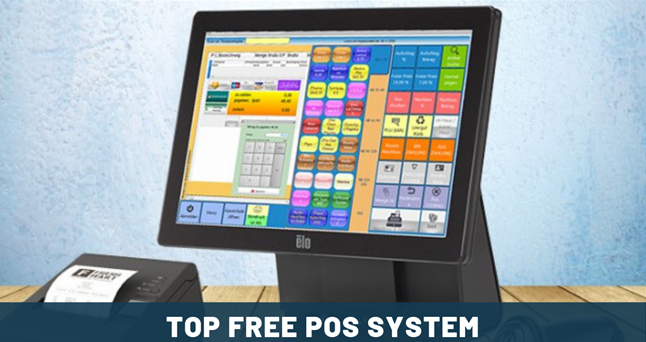


For retail businesses running on Windows, choosing the right Point of Sale (POS) software is important for smooth daily operations and accurate sales management. Fortunately, there are several top free POS solutions that combine essential retail features—like inventory tracking, customer management, and sales reporting—with the convenience and familiarity of the Windows operating system, making them ideal for small to medium-sized businesses looking to start efficiently without upfront software costs.
Free POS Software for your Retail Store that are usually easy to use for both Online as well as offline transactions using POS Software is usually needed by business owners. The best free point of sale (POS) or point of purchase (POP) depends on the time and place where a retail transaction is completed. At the point of sale, the merchant calculates the amount owed by the customer, indicates that amount, may prepare an invoice for the customer which may be a cash register printout, and indicates the options for the customer to make payment.
Top Free Retail Point of Sale (POS) Software with Windows Operating System
Running a retail business efficiently requires more than just good products and customer service—it demands a reliable Point of Sale (POS) system. For businesses using Windows, the right POS software can streamline daily sales, manage inventory, track customer behavior, and generate reports, all while saving time and reducing errors. Fortunately, 2026 offers several free POS solutions compatible with Windows, giving small and medium retailers the tools they need without breaking the budget.
Why Choose a Free POS for Windows?
Windows remains one of the most widely used operating systems for business environments due to its stability, hardware compatibility, and extensive software ecosystem. A free POS system on Windows allows retailers to:
- Process sales quickly and accurately
- Track inventory and stock levels in real time
- Maintain customer records for loyalty programs
- Generate basic sales and financial reports
- Integrate with compatible hardware like receipt printers, barcode scanners, and cash drawers
Free POS software is ideal for small stores, pop-up shops, and startups because it provides professional functionality without upfront costs, while still allowing room for growth as the business expands.
a clear comparison table to help you choose the best free retail POS software for Windows based on features, ease of use, and hardware support:
📊 Free Retail POS Software for Windows — Comparison Table
| POS Software | Best For | Pros (Strengths) | Cons (Limitations) | Windows Hardware Support |
|---|---|---|---|---|
| OSPOS (Open Source Point of Sale) | Small shops, beginner users | 🎯 Web‑based (runs in browser), easy inventory & sales, customizable, free forever | ⚙️ Needs local server setup (WAMP/XAMPP) for Windows | ✔ Barcode scanners, receipt printers, cash drawers |
| uniCenta oPOS | Retail & mid‑size stores | 👍 Classic desktop POS interface, multi‑terminal, barcode support, offline mode | 📘 Slightly steeper learning curve vs web apps | ✔ Strong peripheral support (printers, scanners) |
| Chromis POS | Retail & hospitality | 💡 Simplified uniCenta fork, good hardware integration, free | 🔌 Fewer advanced modules than uniCenta | ✔ Printers, scanners, card readers via plugins |
| Floreant POS | Retail + café/restaurant hybrid | 🍽️ Handles table/orders, receipts, multi‑user | 🛠 More restaurant‑oriented features than retail‑only | ✔ Printers, cash drawers; limited barcode focus |
| Odoo POS (Community) | Stores needing ERP growth | 📦 Integrated with inventory, CRM, ecommerce | 💻 More complex to install; cloud/ERP skills help | ✔ Broad hardware support via configuration |
| ERPNext POS | Business owners wanting all‑in‑one system | 🔄 Full ERP + POS integration | 📊 ERP complexity might overwhelm beginners | ✔ Generic POS support via web browser |
Breakdown: What the Table Means for You
✅ Best for Absolute Beginners
- OSPOS — Easy sales & inventory tracking, runs in the browser on Windows. Great if you want very simple and no cost forever.
- Chromis POS — Easier entry than uniCenta, with good hardware support.
📈 Best for Retail Growth
- uniCenta oPOS — Offers multi‑terminal checkout, offline support, and broader inventory tools — ideal when you expand beyond a single register.
- Odoo POS (Community) — Perfect if you want POS plus business features like ecommerce, CRM, and accounting all in one growing platform.
🍽 Good for Mixed Retail & Food Service
- Floreant POS — Originally for restaurants, but usable for retail selling too. Useful for shops that also serve food or drinks.
- ERPNext POS — Great if you want everything under one roof (POS + ERP) and are comfortable with a slightly complex system.
🎯 Quick Tips for Windows POS Setup
✔ Hardware: Most free POS systems support common Windows peripherals like USB barcode scanners and receipt printers (Epson, Star Micronics, etc.). Always check compatibility before buying hardware.
✔ Installation:
- Web‑based POS (e.g., OSPOS, Odoo, ERPNext)
→ Runs in a browser (Chrome, Edge) and usually needs a local server stack (WAMP, XAMPP) on Windows. - Desktop POS (uniCenta, Chromis, Floreant)
→ Java‑based installers that run natively on Windows with minimal configuration.
✔ Support: Open‑source tools rely on community forums and documentation; some offer paid support if you need help.
🛍 Which One Should You Pick?
- First, if your priority is simplicity:
OSPOS → Fast to start, easy interface, minimal setup. - Secondly, if you want robust retail features:
uniCenta oPOS or Chromis POS → More cash registers, better inventory features. - Thirdly, if you want business integration (beyond POS):
Odoo POS or ERPNext POS → Grows with your business. - Lastly, iIf you also serve food or run a hybrid store:
Floreant POS → Built with restaurant workflows but usable for retail.
Top Free Retail POS Software for Windows
Below are some of the most popular free POS solutions you can run on a Windows machine in 2026:
1. OSPOS (Open Source Point of Sale)
Overview: OSPOS is a web-based, open-source POS system that runs smoothly on Windows using a local server or WAMP/LAMP stack. It is beginner-friendly and ideal for small retail shops.
Key Features:
- Sales processing with multiple payment types
- Inventory and product management
- Customer and supplier tracking
- Reporting and analytics
Why it’s good for Windows users: OSPOS can run locally on Windows without an internet connection, making it highly flexible for new retailers. Its open-source nature also allows customization if your store grows.
2. uniCenta oPOS
Overview: uniCenta oPOS is a Java-based desktop POS application compatible with Windows. It is widely used in both retail and hospitality, offering a more traditional cash register interface.
Key Features:
- Multi-user and multi-terminal support
- Barcode scanning and printing
- Offline mode and local database storage
- Advanced inventory tracking
Why it’s good for Windows users: uniCenta’s desktop app runs directly on Windows without a web server, making setup straightforward for first-time POS owners. Optional paid support is available if professional assistance is needed.
3. Chromis POS
Overview: Chromis POS is a fork of uniCenta and is fully open-source. It is designed for small to medium retail and hospitality businesses, with strong support for peripheral hardware.
Key Features:
- Sales management and customer tracking
- Loyalty and gift card features
- Integration with barcode scanners and receipt printers
- Multi-terminal operation
Why it’s good for Windows users: Chromis POS runs smoothly on Windows and is simple to install and operate. Its hardware compatibility makes it a solid choice for retail businesses setting up a complete checkout system.
4. Floreant POS
Overview: Floreant POS is geared primarily toward restaurants and cafés but can be adapted for retail. It is Java-based and runs on Windows desktops.
Key Features:
- Sales and inventory management
- Table management and kitchen printer integration
- Employee and shift tracking
- Reporting and analytics
Why it’s good for Windows users: While tailored for hospitality, Floreant POS’s features can support retail scenarios like stock tracking and multi-user checkout. Its desktop installation on Windows is simple and reliable.
Tips for Choosing the Right Free POS for Windows
- Consider Your Business Type: Retail-focused POS like OSPOS or uniCenta are ideal for stores, while Floreant may suit hybrid or café-retail setups.
- Hardware Compatibility: Ensure the POS works with Windows-compatible printers, scanners, and cash drawers you plan to use.
- Ease of Use: A simple, intuitive interface reduces training time and errors for first-time users.
- Support & Community: Free POS software often relies on community forums and documentation. Check if paid support is available if needed.
- Growth Potential: Choose software that can scale with your business—multi-terminal support, expanded inventory, and optional plugins can help.
Recommendations
For first-time Windows POS owners, free retail POS software provides a low-risk, high-value solution to manage sales, inventory, and customers efficiently. Solutions like OSPOS, uniCenta oPOS, Chromis POS, and Floreant POS offer robust features, flexible installation, and the ability to scale as your business grows. By selecting the right system for your store, you can simplify checkout operations, improve accuracy, and gain insights into your sales trends, all without the cost of proprietary POS software.
Starting with a free POS on Windows is not just a way to save money—it’s a smart strategy for building a professional, scalable retail operation from day one.
For a business with 5 different shops (clothing, café, grocery, and drinks) — where you need reliable sales, inventory across locations, multi‑terminal support, and growth‑ready tools — here are the best POS recommendations tailored to your needs in 2026:
⭐ Top Recommendation: Odoo POS (Community + Paid Add‑Ons)
Why it’s the best overall for your setup:
- 📍 Multi‑location support: Handles multiple shops under one system with centralized inventory and reporting.
- 🛍️ Unified back office: One platform for POS, stock control, purchasing, accounting, and CRM.
- 🍽️ Flexible: Works for retail (clothing, grocery, drinks) and café (order/tables) with optional modules.
- 💻 Windows compatible: Web based — runs on Windows browsers and local servers.
- 📊 Scales with you: Add e‑commerce, loyalty, advanced reporting, and apps as you grow.
Best for: Businesses with multiple store types and locations who want one integrated system, not separate apps per shop.
🥈 Strong Alternative: uniCenta oPOS
Why it’s great:
- 🧮 Multi‑terminal & multi‑store friendly: Designed for retail environments with multiple checkout counters.
- 📦 Solid inventory tracking: Good for clothing and grocery where stock matters.
- 🖥️ Works offline too — good if internet reliability varies.
Considerations:
- Not as integrated as Odoo’s full suite — mainly POS and inventory, so you may need separate accounting or CRM tools.
- Café features (like table splits) aren’t as built‑in as restaurant‑specific systems, but simple café sales still work well.
Best for: Retail‑focused businesses that mainly need dependable checkout and stock control across stores.
🧁 For Café + Drinks Shop Variant: Floreant POS
Why it’s useful:
- 🪑 Table management and ticketing — better suited for cafés and drink service than basic retail POS.
- 🍽️ Can still handle orders, splits, and kitchen printing.
- 💼 Works on Windows via Java.
Considerations:
- Inventory and retail features are basic compared to uniCenta or Odoo — best used in combination with them or for the café only.
Best for: Café or drink‑service locations where you need tables, orders, and receipts, rather than just ring‑up sales.
Quick Recommendation Based on Your Shops
| Shop Type | Best POS Fit |
|---|---|
| Clothing (Retail) | Odoo POS or uniCenta oPOS |
| Grocery (Retail) | Odoo POS or uniCenta oPOS |
| Drinks Shop (Retail) | Odoo POS or uniCenta oPOS |
| Café (Food & Beverage) | Odoo POS (+ café modules) or Floreant POS |
📌 Overall best choice: Odoo POS — because it can cover all five shops with one system, centralizing inventory, reporting, and customers. You can start with the free Community version and selectively add paid apps or support as needed.
🧾 Why Odoo POS Works Best for You
✔ One system for 5 shops — no fragmentation
✔ Central inventory & reporting — real stock visibility
✔ Multi‑register & multi‑user support
✔ Windows friendly (runs in browser or locally)
✔ Add café/tables, ecommerce, loyalty later
🛠 What You’ll Want to Set Up
To run this smoothly across all your shops:
📌 Hardware
- Windows PCs / tablets at each register
- Receipt printers & cash drawers
- Barcode scanners for grocery & clothing
- Optional card terminals integrated with POS
📌 Software Add‑Ons (Optional)
- Accounting sync (to simplify books)
- Loyalty/CRM module
- Ecommerce store sync (if you sell online)
📍 Next Steps
- Decide whether you want self‑hosted or cloud‑hosted Odoo
- Install Odoo Community Edition
- Configure 5 locations and inventory rules
- Train staff on basic checkout and reporting
- Add modules like café/tables or ecommerce when needed
If you’d like, I can walk you through step‑by‑step setup instructions for Odoo on Windows — just tell me what hardware you have and whether you prefer cloud hosting or local installation.
Previous Updates for Top Free Point of Sale (POS) Software
- Windows POS7.65.195
- Loyverse9.58.195
- eHopper7.69.152
- Imonggo7.68.5451
1. Windows POS
Windows POS is a point of sale application that contains comprehensive features that enable merchants to easily handle their business needs. The business needs range from loyalty and CRM, to layaway and age verification. Windows POS provides an intuitive design that enables users to get trained on retailcloud Windows POS in the shortest time possible.
The main features of Windows POS include tablet POS, Mobile POS, retailcloud online, skedool-scheduling App, inventory manager, mInventory, and nGauge analytics. The tablet POS is an application that provides an excellent platform for engaging with your customers at the counter. The tablet point of sale…
OVERVIEW & FEATURES
- Windows POS
- Tablet POS
- Mobile POS
- Retailcloud online
- Skedool-scheduling App
- Inventory manager
- Inventory
- Gauge analytics
WHAT IS BEST?
- Windows POS
- Tablet POS
- Mobile POS
WHAT ARE THE BENEFITS?
- Provides tools for easy handling of business needs
- Easy handling of customer loyalty, CRM, Layaway, and age verification
- Provides a platform for engaging with customers
BOTTOM LINE
Windows POS is a point of sale application that contains full featured products and features that enable merchants and retail owners to easily handle their business needs that ranges from loyalty, CRM to Layaway and age verification.
2. eHopper
eHopper is a complete cloud-based POS system that provides all-in-one solutions for running small businesses successfully. eHopper presents the point of sale feature that is available on Android, iPad, tablets, PCs and the Poynt terminal.
The point of sale feature is quick, efficient, and intuitive to use and provides an easy setup that enables users take payments from your customers in minutes. The point of sale also enables adding and scanning of items directly into your cart. The order management feature enables selection of order types such as quick sale, take out, and delivery. The customer management feature presented by…
OVERVIEW & FEATURES
- Pont of sale
- Order management
- Order tracking
- Customer management
- POS payments
- Split Payments
- Receipts
- Inventory management
- Employee management
- Tip management
- Tax management
- POS for quickBooks
- Reporting
- Apps and integrating
- Localization
- Multi-store
- POS hardware
WHAT IS BEST?
- Point of sale
- Order management
- Order tracking
WHAT ARE THE BENEFITS?
- Ring up sales with ease
- Save time on business operations
- Access your data anytime, anywhere
BOTTOM LINE
eHopper is a fully integrated cloud-based POS system that provides a complete set pf solutions used for running small businesses successfully and is able to run on a wide range of multiple devices and platforms.
3. Loyverse
Loyverse POS is a free sales system developed for small and medium businesses. It is an ideal POS for retail stores, bars and restaurants, coffee shops, car wash stations, and individual businesses to name but a few. Loyverse POS is free and does not require any contracts, credit cards, and commitments.
The application is powerful to address multiple aspects of point of sales management, including tracking sales and inventory in real time, managing items, and looking at sales reports among others. Loyverse POS is fully optimized for mobile devices, turning smartphones and tablets into instant cash registers. With Loyverse POS,…
OVERVIEW & FEATURES
- Mobile Free POS
- Cash & employee Management
- Printable Receipts
- Work Offline
- Sales Analytics & Tracking
- Loyalty Program & Payment Handling
- Customer Communication
- Inventory & multi-shop Management
- Stock Management
- System Security & Software Management
- Multiple Payment Types & languages
- Purchase and Consumption Tracking
- Dashboard App
- Kitchen Printer
WHAT IS BEST?
- See all tickets at a glance with colors indicating wait time.
- Never miss a new order using sound notifications.
- View list of completed orders and re-open them if necessary.
WHAT ARE THE BENEFITS?
Make quick and easy sales; manage the loyalty program and inventory — all from the smartphone or tablet.
Build a customer base and send notifications and stay in touch.
Send messages and e-receipts to the customers and collect valuable feedback.
BOTTOM LINE
Loyverse POS is a free sales system developed for small and medium businesses which is an ideal POS for retail stores, bars and restaurants, coffee shops, car wash stations, and individual businesses to name but a few.
Related Articles
- 10 Trends of IoT Communications Development
- Top Rated Unified Security Management Software
- Mobile App Development Trends and Technologies
- WeTransfer App Pro Alternatives – Plus Websites
- 10 Predictions for Information Data Centre and the Cloud
4. Imonggo
Imonggo is a point of sale application that provides solutions needed in managing a user’s store. Some of the solutions provided by Imonggo include inventory tracking, credit card processing, customer loyalty, sales reporting, and many more. Imonggo enables businesses have unlimited growth as it provides a scalable platform and supports multi-store set-ups.
Imonggo is a web-based platform therefore enables users to access their data at any time and from any location. The main features of Imonggo include stockroom, office, store, addition of service types, customer membership, and set reward promos. The customer membership feature presented by Imonggo provides instant points…
OVERVIEW & FEATURES
- Barcode scanning
- Loyalty program support
- Restaurant POS
- Returns tracking
- Layaway management
- Customer account profiles
- Discount management
- Sales tracking
- Pricing management
- Touch Screen
WHAT IS BEST?
- Barcode scanning
- Loyalty program support
- Restaurant POS
WHAT ARE THE BENEFITS?
- Can be used anytime and anywhere
- User-friendly design
- Interactive catalog
BOTTOM LINE
In summary, Imonggo is a point of sale application that provides several solutions such as the inventory tracking, credit card processing, customer loyalty, and sales reporting required for managing a user’s store.
Notes Before You Choose
- Open source means free core software, but premium support, hosting, and custom development often cost extra.
- Linux support usually requires installation on a Linux server, LAMP stack, container, or virtual machine.
- For broader business needs (accounting, ecommerce), ERP-integrated POS systems like Odoo or ERPNext offer more complete capabilities.


