Your Android phone is smarter than you think because it now has Free AI Apps & Tools for Android devices. It has Free AI Tools That Will Transform Your Android experience. Beyond calls, chats, and social media, it already packs hidden AI features that make everyday life easier—from cleaning up your photos to predicting your next text. But here’s the exciting part: you don’t have to stop at the built-in features.
A growing wave of free AI-powered apps can turn your Android device into a personal assistant, creative studio, or productivity hub. Instead of downloading random apps and hoping they work, we’ve rounded up eight free AI tools that actually deliver real value for Android users. These Android Development AI Tools are the Top AI Apps & Features for Your Android Device you can download from Google Play store.
15 Best Artificial Intelligence-Based Android Apps
These are some favorite AI apps on Android right now. You can use them to acquire all the Concepts of Artificial Intelligence (AI) along with AI chat. Simply access all the newly Introduced Generative AI Tools for your accelerated Productivity.

1. Microsoft Copilot – Like Having a Smart Friend in Your Pocket
Have you tried Microsoft Copilot yet? Tech bros says that it can be the number one in the Top Free AI Apps & Tools for Android users to improve their tech experience. Honestly, it feels less like a chatbot and more like having a super-smart buddy you can lean on anytime. You can ask it questions, get it to write stuff for you, create images, or even help with coding. And the cool part? It works smoothly right on your Android phone.
Here’s why people like it:
- It runs on GPT-5, which means you can switch between quick, casual chats and really detailed problem-solving.
- You don’t always have to type—just talk to it, and it responds in a voice you can even customise.
- Stuck with an assignment, code, or spreadsheet? It can connect with Microsoft Word and Excel to give you a hand.
- Feeling creative? Just type an idea, and Copilot will generate an image in seconds.
Of course, nothing’s perfect. The app itself is free and gives you access to some seriously powerful AI models, but if you want the full Microsoft 365 integration, you’ll need a subscription.
That said, the interface is super clean, easy to use, and it even remembers your past chats—so you don’t have to start from scratch each time. No wonder it has a 4.6/5 rating on the Play Store. Download Microsoft Copilot for Android.
2. DeepSeek – The Free AI Assistant That Thinks Deeply
Ever heard of DeepSeek? It’s one of those hidden gems in the AI space—completely free and open-source. What makes it stand out is that it doesn’t just chat with you casually; it actually helps you think through complex stuff.
Here’s what we mean when we say its among Top Free AI Apps & Tools for Android Users to Improve Tech Experience:
- You can literally upload entire documents—PDFs, Word, Excel, even plain text—and it will summarise, translate, or answer questions based on what’s inside. Super handy for students or anyone working with long files.
- It’s also great for programmers. Whether you’re debugging, writing new code, or trying to understand a tricky function, DeepSeek can lend a hand in different programming languages.
- The app comes with two cool modes: Search, which gives you quick online answers, and DeepThink, which slows down to reason more carefully when the question is complex.
Now, here’s the thing:
- On the advantage side, it’s 100% free and doesn’t bombard you with ads (which is rare these days).
- But on the flip side, it’s a bit slower compared to apps like ChatGPT or Google Gemini, and it doesn’t do images, audio, or video—it’s text-only.
Still, if you just want a powerful text-focused AI assistant without paying a dime, DeepSeek is absolutely worth checking out. No wonder it’s sitting at 4.3/5 rating on the Play Store. Download DeepSeek AI Assistant for Android.
3. Perplexity – The Smarter Search Buddy
You know how searching on Google sometimes feels like work—you type in keywords, then scroll through 10 different links before finding what you need? Perplexity makes that process way easier. It’s like having a search assistant that not only gives you an answer but also shows you exactly where it got the info from.
Here’s why people love it:
- Instead of just links, it gives you direct answers with citations. So if you’re writing a paper or doing research, you can actually trust the sources.
- It pulls info from everywhere—social media, blogs, and even academic journals—so you don’t miss out on different perspectives.
- You can even upload files like PDFs, and Perplexity will combine them with web search results to give you context.
- Need up-to-date stuff like stock market updates or trending news? It can handle that too, plus you can ask follow-up questions to dig deeper.
Of course, there are some catches:
- The free version is limited, especially when it comes to premium AI models and full access to cited sources.
- Sometimes, it still makes mistakes or misreads sources (like most AI tools).
- For really advanced queries, you might need to pay for the subscription.
Still, if you’re tired of scrolling endlessly on Google, Perplexity is a game-changer. And with a 4.4/5 rating on the Play Store, a lot of Android users agree it’s worth trying. Download Perplexity from Play Store.
4. Google Lens – Your AI Visual Assistant
Typing can sometimes be boring when surfing the internet. With this Free AI Apps & Tools for Android and iOs, you can forget about typing out long searches, just point your camera to the item and get a search result immediately. Google Lens can scan objects, text, or even landmarks and instantly provide useful information. Need to translate a restaurant menu, identify a plant, or copy handwritten notes straight into your phone? Lens makes it possible in seconds.
Its AI vision turns your camera into a powerful assistant, bridging the gap between the physical and digital worlds. From helping with homework to shopping for that “I saw it but don’t know the name” item, Google Lens is one of the most practical everyday AI tools on Android.
Google Play Store rating: 4.6/5.0
5. Grammarly Keyboard – Your Pocket Writing Coach with Smarter Typing on the Go
Are you tired of typos and awkward sentences? If you’ve ever sent a message and then thought, “Oops, did I spell that right?” or “Hmm, does this sound too harsh?”, that’s where Grammarly comes in. Think of it as your personal writing coach that sits right on your Android phone. Grammarly’s AI keyboard integrates with your Android so every email, chat, or social media post looks polished. It doesn’t just fix spelling—it suggests clearer wording and tone, making you sound professional without the stress.
Grammarly can do the following:
- It checks your grammar, spelling, and punctuation in real-time while you’re typing—whether it’s WhatsApp, Gmail, or even social media.
- It also has a tone detector, so if you’re writing to your boss, it’ll stop you from sounding too casual, and if you’re texting a friend, it makes sure you don’t sound like a robot.
- The newer AI rewrite feature is amazing. You can take any sentence, hit rewrite, and Grammarly will make it clearer, smoother, or even more polite.
- For students and professionals, it even comes with plagiarism and AI detection tools—super helpful if you’re worried about originality.
Of course, nothing’s perfect:
- The free version works fine for everyday writing, but advanced stuff like plagiarism checks needs a subscription (around $12/month).
- Also, it’s heavily geared toward English. So, if you write in multiple African languages, you won’t get the same level of support.
Still, for anyone who types a lot on their phone, Grammarly is a lifesaver. No wonder it has a 4.5/5 rating on the Play Store—people trust it to make their words shine.
6. Claude by Anthropic – The Thoughtful Conversational Partner
If you’ve ever wanted an AI that feels a little more human in the way it chats, then Claude might be the one for you. It’s built to be helpful, honest, and careful with its answers—sometimes even re-checking its own response to make sure it’s not giving you something biased or misleading.
What makes Claude stand out is how well it handles long, complex stuff. You can throw an entire PDF, a stack of slides, or even a big Excel sheet at it, and it won’t get confused. Instead, it can summarise, explain, or answer questions without losing track of what’s going on. That makes it especially useful for students, professionals, or anyone working with a lot of documents.
For coders, Claude is also a handy partner. It can write and debug code in multiple programming languages, and even explain what’s going on in a piece of code—whether you’re a beginner trying to learn or an experienced programmer stuck on a bug.
Of course, it’s not perfect:
- Unlike some of its rivals, Claude is still text-only—so no voice input or spoken responses.
- It doesn’t let you customise tone and style as much as Microsoft Copilot or ChatGPT.
Still, with its generous free plan, nuanced conversations, and ability to handle huge documents without breaking a sweat, it’s easy to see why users love it. And with a 4.6/5 rating on the Play Store, it’s one of the top AI apps on Android right now. Download Claude on Play Store.
7. Starryai AI Art Generator – Turning Your Ideas Into Digital Art
If you’ve ever wished you could just describe a picture in words and have it appear, that’s exactly what Starryai does. It’s an AI art generator that takes your text prompts and transforms them into unique visuals—sometimes surreal, sometimes stunning, and occasionally a bit unpredictable. The Starryai AI Art Generator is definitely among the Free AI Apps & Tools for Android devices you must try.
What’s cool is that it’s not limited to just making images from scratch. You can also upload your own photos and use the app to enhance, edit, or even train it to create future art in your preferred style. This means the more you play around with it, the more personal and tailored your results can become.
Another fun part of Starryai is the community aspect. You can share your creations, check out what others are making, and even join challenges that let you unlock premium features without spending money.
Of course, it’s not perfect:
- The free tier on mobile has lots of ads, which can get annoying.
- If you want to make videos, you’ll need to upgrade to the paid plan.
- And sometimes, the images don’t quite hit the mark—you might get something blurry or off-prompt.
Still, if you’re curious about AI art and want to experiment across different styles for free, Starryai is a fun playground. With a 4.2/5 Play Store rating, it’s one of the go-to options for anyone who wants to bring their imagination to life on Android. You can Download Starryai from Google Play store.
8. ChatGPT Mobile – Your All-in-One AI Companion
At this point, ChatGPT almost needs no introduction—it’s one of the most popular AI assistants around. If you are looking for Free AI Apps & Tools for Android devices, the ChatGPT must be among your list. On Android, it works like a versatile pocket companion that can answer your questions, help with work or school tasks, and even spark creative ideas when you’re stuck. Instead of switching between apps or searching endlessly online, ChatGPT’s Android app can help brainstorm, explain concepts, draft messages, or even generate business ideas. It’s like having a pocket-sized researcher and writer ready whenever you need it.
One flexible feature is voice mode, which means you don’t even have to type—you can just talk to it. Plus, if you use ChatGPT across different devices, your chat history syncs automatically, so you can pick up right where you left off. And yes, it’s not just about text—you can also create AI-generated images directly within the app.
Now, let’s talk real-world use:
- The free tier is generous. It’s ad-free, simple to navigate, and even gives you limited access to advanced models.
- Beginners especially love the clean design—it doesn’t overwhelm you with options.
- But, during peak hours, you might notice the responses slow down a bit.
- And if you need power features like advanced data analysis or uploading lots of files, you’ll need a paid plan.
With a 4.6/5 Play Store rating, ChatGPT remains a top pick if you want an AI app that balances usefulness, creativity, and ease of use without feeling complicated.
9. Otter.ai – Your AI Meeting Note-Taker
If you’ve ever struggled to keep up with meeting notes or interviews, Otter.ai might feel like a lifesaver. It’s an AI-powered transcription tool that works in real-time, so while you’re talking (or listening), it’s busy turning speech into text. Otter.ai always transcribe conversations effortlessly. If you need to capture a meeting, lecture, or brainstorming session, this is your best choice. Otter.ai records and instantly transcribes audio into text. Students, journalists, and business people swear by it because it saves time and keeps records accurate without manual typing.
One of its best tricks is how easily it integrates with Zoom, Microsoft Teams, and Google Meet. You can let Otter.ai sit in the meeting with you, and by the end, you’ll have an automatic transcript plus a neat summary of the key points. It can even separate different speakers, which makes reading back a long discussion much less confusing. And if you already have a recording, you can simply upload it and let Otter.ai do the transcription for you.
Now, for the practical side:
- The free plan is actually quite fair—you get 300 minutes of transcription a month (with a 30-minute cap per session).
- It supports English, French, and Spanish for transcription and summaries.
- But here’s the catch: free users can only import three audio or video files in total—not per month, but ever. That’s a tough limit if you deal with recordings often.
- And for some accents, especially African accents, Otter.ai still struggles to transcribe with high accuracy, which can make the notes less reliable.
Google Play Store rating: 4.6/5.0
Overall, Otter.ai is excellent if your work involves a lot of meetings and you just want a digital assistant to take notes while you focus on the conversation. You can Download Otter.ai App from Play Store too.
10. Microsoft SwiftKey – Predictive Typing That Learns You
SwiftKey takes predictive text to the next level. The more you type, the smarter it gets, learning your writing style and even supporting multiple languages. Its AI engine makes texting faster and more natural, especially for people who juggle English, Pidgin, and local dialects.
In a physical sense, typing on a phone can sometimes feel like a chore. That’s where Microsoft SwiftKey steps in. It’s not just a regular keyboard; it’s an AI-powered predictive typing tool that gets better the more you use it.
Over time, SwiftKey starts to learn your unique writing style—from the slang you use to the way you structure your sentences. This makes texting faster, smoother, and way more personal. For people who constantly switch between English, Pidgin, or even local dialects, SwiftKey’s multi-language support is a lifesaver. No more constant back-and-forth between keyboards—SwiftKey just keeps up.
It also comes with swipe-to-type, emoji predictions, and cloud sync, so your typing style carries over across devices. For Android users who want to save time while still sounding like themselves, this is one of those small but mighty apps that can quietly upgrade your daily routine.
Google Play Store rating: 4.4/5.0
11. Google Photos – AI That Organizes Pictures for Lasting Memories
With thousands of photos in your gallery, finding one can be painful. Google Photos uses AI to sort pictures by faces, places, or events. It also offers automatic photo enhancements and even creates mini highlight reels—saving you hours of scrolling. We’ve all been there—you want to show someone a picture, but scrolling through thousands of random shots feels like looking for a needle in a haystack. That’s where Google Photos makes life easier.
Using AI-powered organization, the app automatically sorts your pictures by faces, places, and events. So instead of endless scrolling, you can just search “wedding,” “birthday,” or even a friend’s face, and boom—there’s your memory.
It doesn’t stop there. Google Photos also offers automatic photo enhancements, turning dull shots into polished images. Plus, it can create mini highlight reels and collages from your best moments, almost like having a personal editor working in the background. For people who snap tons of photos on Android, it’s one of those apps that quietly takes the stress out of managing your memories.
Google Play Store rating: 4.5/5.0
12. FaceApp – AI for Creative Photo Editing
Not every AI tool has to boost productivity—some are just plain fun. FaceApp is one of those apps that lets you play around with your selfies in creative ways. Using powerful AI, it can transform your look by adding filters, changing hairstyles, or even showing you what you might look like decades from now.
It’s a lighthearted way to experiment with style without committing to a haircut or color change in real life. And while it’s playful on the surface, it also highlights just how far AI-powered image editing has come—making complex edits that once required professional software possible in just a few taps.
Google Play Store rating: 4.4/5.0
13. Canva – AI-Powered Designs Made Simple
Do you need a quick flyer, Instagram post, or business card but don’t have design skills? Canva’s Android app is mong the Free AI Apps & Tools for Android devices makes it easy with AI-driven templates and smart design suggestions that instantly give your work a professional edge. Whether you’re a small business owner, a student preparing a presentation, or a content creator on a budget, Canva helps you create polished visuals in minutes.
It’s like having a personal graphic designer in your pocket—minus the cost and long hours. With drag-and-drop editing, AI-assisted layouts, and thousands of ready-to-use templates, Canva makes sure your designs stand out without the stress.
Google Play Store rating: 4.7/5.0
14. Gemini – Google’s AI Assistant for Everything
Gemini is Google’s next-generation AI assistant, built right into Android. It combines the best of Google Search with powerful AI models, meaning you can ask it to summarize articles, draft emails, translate languages, or even generate code. Unlike older assistants, Gemini can also understand context across text, voice, and images—so you can upload a picture, ask a question about it, and get an instant explanation.
It’s more than just a chatbot—it integrates directly with apps like Gmail, Docs, and Maps, making it useful for both work and daily life. Whether you need directions, quick research, or help writing a document, Gemini keeps everything in one place.
Google Play Store rating: 4.5/5.0
15. Cortana – Microsoft’s AI Productivity Partner
Cortana may not be as flashy as some newer AI apps, but it still shines as a productivity-focused assistant. Designed by Microsoft, Cortana helps Android users stay on top of tasks by managing reminders, syncing calendars, sending quick emails, and even controlling apps with voice commands. If you’re someone who relies on Microsoft 365 (like Outlook, Teams, or OneDrive), Cortana ties everything together seamlessly.
While it’s not as widely used on Android as Google Assistant or Gemini, Cortana is a solid option for people who live in Microsoft’s ecosystem and want an AI assistant that feels like a digital secretary—always keeping your schedule and tasks in check.
Google Play Store rating: 4.3/5.0
Final Thoughts of these Free AI Apps & Tools for Android devices
At the end of the day, whether you want to boost your productivity, study smarter, or just get quick answers, there’s definitely a free AI app that fits your needs. From ChatGPT and Claude for conversations, to Grammarly for polishing your writing, to Starryai for unleashing creativity, these tools are no longer “futuristic extras”—they’re everyday helpers.
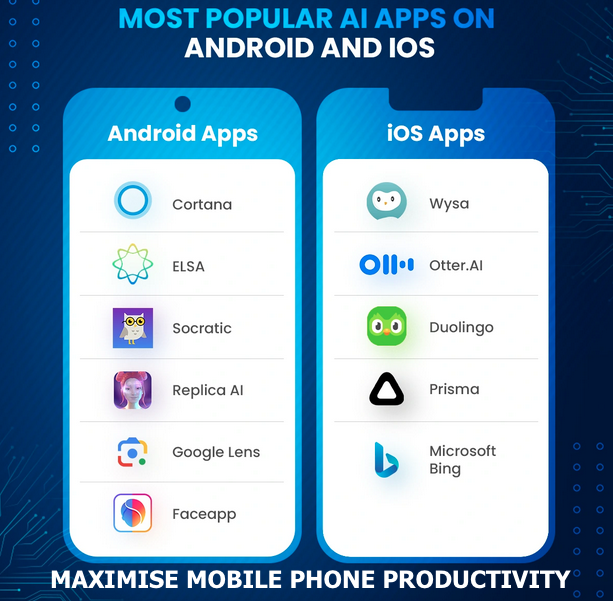
And the best part? As tech giants like Google and OpenAI keep pouring millions into improving their AI models, the apps will only get smarter, faster, and more accessible. You can still try out Amazon Alexa, Replika, ELSA, as well as Socratic. So, if you haven’t tried them yet, maybe now’s the perfect time to add one (or two) to your Android and see how much easier they can make your daily life.