Airtel SmartCash PSB (Payment Service Bank) is a new type of wallet bank owned by Airtel Nigeria. This banking service has everything money transactions in one place, helping you to make day-to-day spending as easy as ABC. Users can easily send money to their Smartcash wallet, accounts, other banks as well as any mobile number. Account owners can receive money from any bank in Nigeria into your smartcash wallet/account. It functions like Opay, MoniePoint, Palmpay, MTN Momo and so on.
When you are out of airtime for making calls or sending SMS, you can simply buy airtime from your Airtel Smart Cash wallet and account. Making cash withdrawals is easy and fast. With money loaded in your SmartCash account, it takes minute to withdrawal cash. You can even make your online bills payment with ease. Don’t want to forget your weekly or monthly payment? You can smartly schedule payments for your frequent or recurring bills. There are always more reasons to transact. Just Dial *939# to get started. The wallet does not need any special Airtel Smatcash data plan to use the app or for transactions.
Airtel SmartCash PSB
SmartCash is all about making banking easy and accessible for everyone in Nigeria. Whether you live in a busy city or in a small rural community, SmartCash provides safe and reliable financial services you can trust. The goal is simple, which is to help more Nigerians join the financial system and support the Central Bank’s mission of financial inclusion. From its headquarter which is based in Lagos, SmartCash is reaching out to even the most remote parts of the country to make sure no one is left behind.
SmartCash Payment Service Bank makes banking simple, fast, and even enjoyable. No matter where you are, whether from the smallest village in the East or North to the farthest town in the West or South, you can now send money, receive payments, and settle your bills right from your phone. No traditional bank account, no queues, no stress. With just your phone line or mobile device, you can access our services through the SmartCash self-care app, USSD, or web channels. Plus, our agents are always nearby to give you all the support you need.
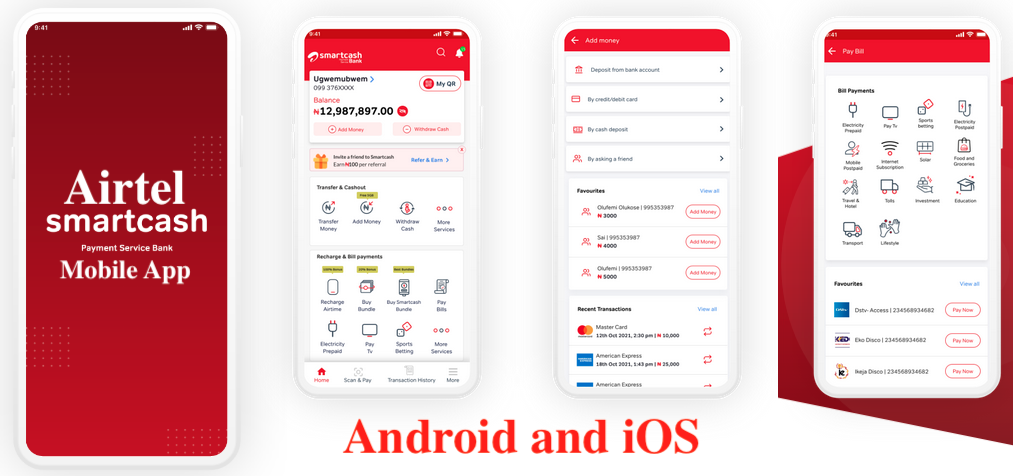
Airtel SmartCash PSB Mobile Application for Android (APK) and iOS (IPA)
SmartCash Payment Service Bank puts customers at the heart of everything it does. Its mission is to bring banking closer to every Nigerian by using a wide network of agents and digital channels to drive financial inclusion. With a strong passion for innovation, SmartCash delivers personalized digital solutions that make everyday financial services simple, fast, and accessible for all. Begin by creating your wallet or account now!

Smart Cash Payment Service Bank at a Glance of History
SmartCash was launched in 2022 after receiving approval from the Central Bank of Nigeria to support the drive for financial inclusion, especially for unbanked and underbanked Nigerians. With SmartCash, people can easily send and receive money (P2P) using their mobile phones or by visiting the nearest merchant outlet. The bank focuses on making financial services accessible for everyday use, handling high-volume, low-value transactions in a safe, reliable, and technology-driven way.
Data Plans for Mobile Network Providers
- Airtel Data Plan, Prices and USSD Codes for Internet Subscription
- MTN Transfer PIN – How to Reset, Share Airtime or Data and Talk time
- Airtel night plan: Does Airtel Have Bonus Night Data Plan?
- Glo Data Plan for Android and iOS Smartphones in Nigeria
Values of Airtel Smart Cash Payment Service Bank
- Alive: Airtel Smart Cash PSB work with passion and a strong can-do spirit. Innovation and an entrepreneurial mindset keep us moving forward.
- Inclusive: They embrace diversity and create solutions that adapt to people’s needs, enriching the lives of the communities they serve.
- Respectful: Smart Cash PSB care deeply about their customers, sharing in both their challenges and successes. We act with humility, honesty, and openness at all times.
Board of Directors of Airtel Smart Cash PSB
The Board oversees the overall management of the Group’s business and ensures sound corporate governance. It remains committed to upholding the highest standards of accountability, transparency, and reporting. There are seven (7) member of the board. The Board of Directors at Airtel Smart Cash PSB includes;
- Ian Ferrao: Non- Executive Director
- Jacques Barkhuizen: Non -Executive Director
- Kingsley Umeadia: Chairman
- Jibril Aku: Director
- Oluseye Dandey: Director
- Mr. Ayotunde Kuponiyi: Managing Director
- Mrs. Olufunmilayo Ajayi: Non-Executive Director
How to download Airtel SmartCash PSB App (Payment Service Bank)
For the Airtel Smatcash app download, please follow the steps below to create your wallet using the App:
- First, visit Android Google Play store or iOS App store on your phone
- Search for Smartcash PSB
- Download and install the Smartcash PSB App
- Follow the prompts to register your account, then login to SmartCash PSB account.
Transactions Users can Perform with Smartcash PSB Wallet
What Activities/Transactions can you perform with Smartcash wallet? You can do all the following below;
- Buy Airtime/Data
- Transfer to Smartcash PSB Wallet or other bank accounts
- Pay Bills (e.g., Cable TV, Electricity bill, Internet Services)
- Fund your wallet from any bank or agent location.
- Receive money on your Smartcash PSB wallet from other banks
- Upgrade your wallet from Tier 1, 2 and 3
- View transaction history
- Cardless Payments – QR Code (Scan & Pay).
- And So much more…
Requirements to Create an Airtel Smartcash PSB Wallet/Account?
What are the requirements to create a Wallet? You will some information to be able to register, login and make use of the smartcash PSB account. The information Airtel will as from you depends on the amount of deposit you want to have. Take a look at it below.
- Tier 1 Wallet Deposit N50,000 / Cumulative Balance N300,000 Requirement – Mobile Number, Name
- Tier 2 Wallet Deposit 200,000 / Cumulative Balance N500,000 Requirement – BVN, Passport Photo, Valid ID card.
- Tier 3 Wallet (No limit).
How to Use SmartCash PSB for Transactions
How do I carry out transactions on Smartcash PSB? It simple, just follow the steps below:
- Download the Airtel Smartcash login app for Android or iOS
- Open your Smartcash PSB app or dial *939#
- Select the transaction type you want to perform
- Follow the prompt to complete the transaction.
Funding Your Airtel Smartcash Wallet
How do I fund my Wallet? Use any of the options below to fund your wallet:
- Transfer from any Smartcash PSB wallet to your Smartcash PSB wallet
- Fund from any bank in Nigeria
- Fund Wallet from any Smartcash Agent Location
Airtel Finance Personal Loan
The Airtel Smartcash Payment Service Bank is not currently giving out loans to anyone. Information about loans will be updated whenever it begins along side the application process. Their services includes;
- Transacting: like transferring and receiving funds.
- Paying bills: and recharging airtime.
- Managing multiple accounts within the app.
- Accessing services via the app, USSD, or agents.
Smartcash Loan App
The Smartcash Loan App is not available. Instead, what is in use is the Smartcash PSB app, a financial service app in Nigeria that allows users to manage their finances, make payments, and send/receive money without a traditional bank account, but does not offer loans directly. For loan services, you would need to look for a specific loan app like SmartLoan or a bank’s loan service.
How to Reset Your Airtel Smartcash PSB Wallet PIN
How do I reset my pin when it is compromised? Did you forget your Airtel Smartcash login password? Just follow these steps;
- Dial *939#,
- Select 7 My Profile.
- Select 1 My Pin
- Select 2 Reset/Forgot Pin
- Answer your Security Question.
- Set 4-digit Pin.
- Confirm 4-digit Pin.
How do I get a Smartcash PSB Wallet?
- Dial *939# and follow the prompts.
- Download Smartcash App from Play store or Appstore.
- Follow the prompts to create your wallet
How to Unblock Wallet?
To unblock your account, please call our customer service number (939) from Airtel lines or (091-25-939-939 from other networks) or send a request mail to Customerservice@smartcashpsb.ng
How do I block my account in case of Fraud?
To block account
Self:
-Dial the code (*939*911#) on your registered number
-Input PIN linked to the account
Third Party Line:
Dial *939*911*Customer Phone Number#
— Input PIN linked to the account
How to Upgrade Airtel Smartcash PSB Account – Payment Service Bank
How do I Upgrade my Payment Service Bank Account? Follow the steps below to upgrade your wallet using the App:
- Log into the App,
- Click on the Name Display
- Click on the arrow.
- You will be directed to the next page where you can upgrade your account.
- Click on Upgrade
- Enter your BVN and click on continue.
- Enter your personal details
- Click on next
- Select an ID card to be added
- Input the ID number and then your account would be upgraded
- Dial *939*,
- Select 7-My Profile
- CSelect 3-Upgrade Wallet/Account.
- Enter Pin to proceed
- Select 2-Upgrade
- Select 1-Provide BVN.
- Enter BVN / Enter NIN
- Provide answer to your security question
Do you need HELP AND SUPPORT with Smart Cash PSB?
- Call for support – 09125-939-939
- Email for support – customerservice@smartcashpsb.ng
- Fraud Reports – frauddesk@smartcashpsb.ng
- To block your wallet.
- Using your mobile number: Dial *939*911# then input your wallet PIN.
- Using other mobile numbers: Dial *939*911* Customer Phone Number# then input PIN linked to the wallet you want to block.
Helpful Topics
- 5 Top Profitable Business You Can Start With Small Capital in Nigeria
- Jaiz Bank USSD Code: How to Transfer Money, Bank Code and Transfers
- USSD Code for Heritage Bank: How to Check Balance
- Gap Credit Card: How to Login, Activate Gap Visa Credit Card
- How to Borrow Money with Instant Cash Advance from your Credit